
Why you need a payments profile
A payments profile holds your Google payment information: your name, address, country and saved cards. It is linked to your Google Account. To connect AnyPay, use a profile in your selected card’s country:
- Ultimate — Singapore.
- Simple — Hong Kong.
Open Google payment settings
Start with the Google Account you plan to use for purchases and subscriptions.
Sign in to your account
Open “Manage your Google Account” → “Payments & subscriptions” → “Manage payment methods”. You can also go directly to the payments center: Open Google Payments
Check the profile country
Open “Settings”. Under “Payments profile”, find “Country/Region”. If you have several profiles, select the right one in the menu next to your name or account picture.
Create a profile in the card’s country
This stage applies if your existing profile is registered in another country. You cannot change the country of an existing profile — a different country requires a new profile.
Start creating the profile
Click the pencil next to “Country/Region” → “Create new profile” → “Continue”. If you do not have a profile yet, enter your information when first setting up a payment method.
Choose the country
Choose Singapore for Ultimate or Hong Kong for Simple. Click “Continue”.
Enter your name and address
Enter your real first and last name in Latin characters. Provide a valid billing address in the selected country: street and building number, city, postal code and any other fields Google asks for. Click “Submit”.
Add your AnyPay card
After creating the profile, add your card. Funds for payment must be on the card’s own balance, rather than only in your AnyPay wallet.
Open the card form
In the right profile, choose “Payment methods” → “Add payment method”. Select a bank card.
Enter the details from AnyPay
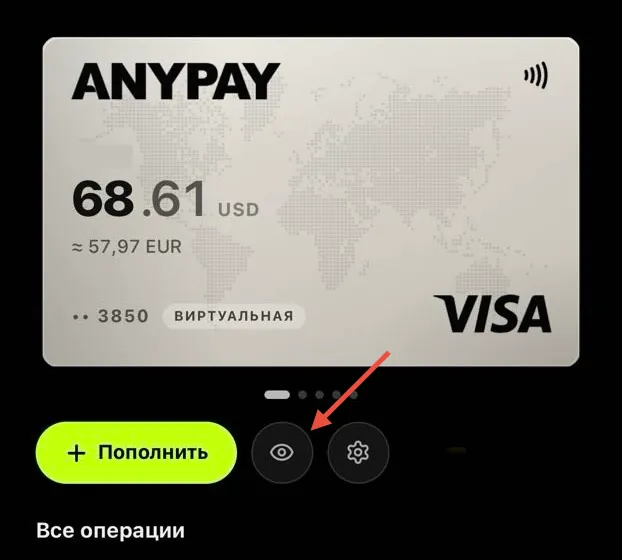
Open your issued card in AnyPay and tap the eye icon below it. Enter the card number, expiry date and CVV/CVC in Google. Use your real first and last name in Latin characters as the cardholder name.
Save the payment method
Check that the billing address matches the selected country. If the address and postal code were filled from the profile, check them. Click “Save” and complete verification if Google asks for it.
 Message us on Telegram